



If you’re looking for a simple device that handles calling, texting, and basic apps, the A67L phone is a common choice for many users. This model is often found in free government phone programs, making it a useful option for families who need an affordable way to stay connected.
1. What Is an A67L Phone? AirVoice A67L Phone Overview
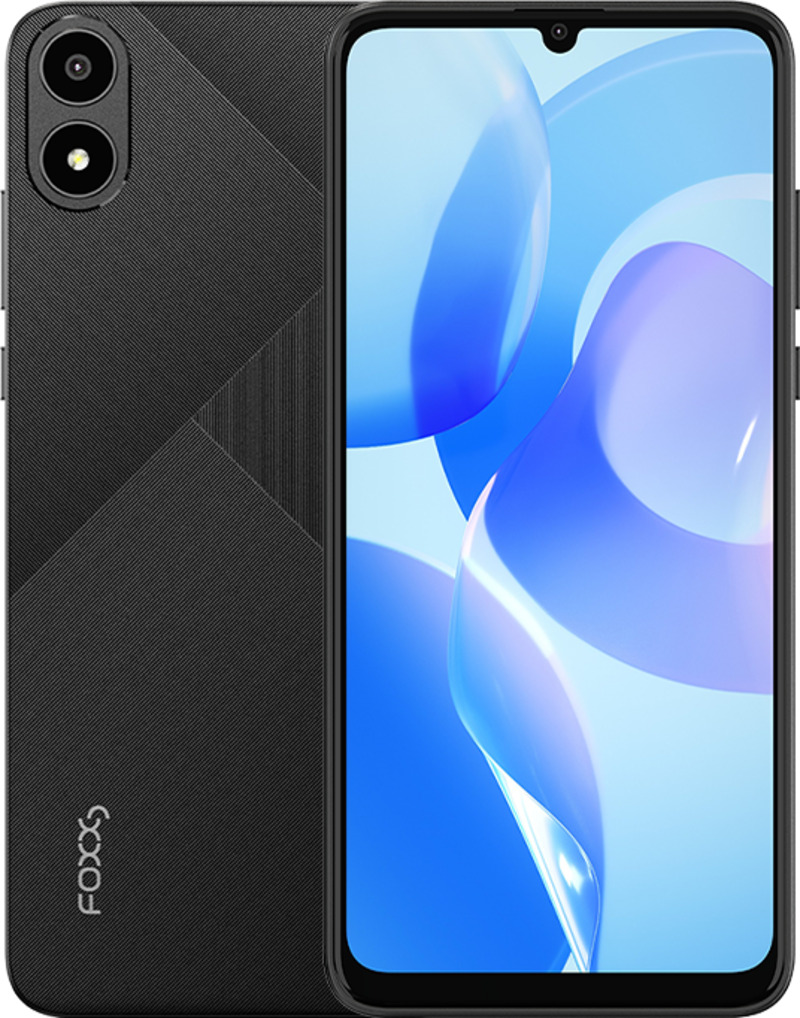
A67L phone is a practical device made for anyone who prefers a phone that doesn’t have complicated features. The AirVoice A67L phone is designed for everyday use, such as making calls, sending texts, handling simple internet browsing, and running basic apps.
The phone has an easy-to-use design and works well for beginners, seniors, and users who want something straightforward. Since it is often included in Lifeline programs, many people can get it for free when it becomes available.

2. Free Government Phone A67L: Who Is Eligible?
2.1 Eligibility for a Free A67L Phone
To qualify for a free A67L phone, you must meet certain criteria, such as having a low income or participating in approved assistance programs like SNAP, Medicaid, SSI, Federal Public Housing Assistance, or Veterans.
If you meet any of these conditions, your household may be eligible for the device through Lifeline providers.
Income-based applicants must fall within the federal poverty guidelines, which depend on the number of people in your household and your state.
2.2 Why the A67L Smartphone Might Be Suitable for You
The A67L phone is one of the most known options because it is reliable and easy for new users to use. The phone supports making calls, sending messages, using common apps, and performing the basic functions most people rely on daily.
If applying and qualifying through AirTalk Wireless,users can set it up quickly without needing any special steps.
>>> Read more: Free Smartphone with Free Monthly Cell Phone Service
3. Availability of the AirVoice A67L Phone
3.1 Where to Find the AirVoice A67L Phone
The AirVoice A67L phone’s availability depends on your ZIP code. Providers like AirTalk Wireless update their device listings frequently, so the phone may appear and disappear based on stock levels.
3.2 How to Check A67L Smartphone Stock in Your Area
You can check your ZIP code and browse available devices on the provider’s website.
Each provider’s selection changes throughout the month, so it’s helpful to check often. If the device is listed, applying quickly is best before inventory changes.
IMPORTANT: The government does not subsidize devices. Lifeline programs cover basic service costs only. Free or discounted devices, upgrade plans, or top-ups are exclusive benefits provided by AirTalk Wireless as part of our promotional offers. Terms and conditions apply. Limited-time promotion—offers vary by state, stock availability, and eligibility.
4. How to Apply for an A67L Phone Through Lifeline
4.1 Step-by-Step Application Guide
Below is a clear guide on how to apply for the A67L phone through AirTalk Wireless. Each step helps ensure your application is processed smoothly.
Step 1: Go to a Lifeline provider’s website
Visit a trusted provider, such as AirTalk Wireless, and open their application page. Their platform shows the latest available device models, including the AirVoice A67L, if in stock.
Step 2: To ensure availability of your ZIP code in our services
Your ZIP code determines whether service is available in your area and whether the A67L phone is listed in the device selection. Lifeline rules may vary by state, so this step filters eligible options for you.
Step 3: Choose your plan
Examine the various options and select the plan that aligns with your requirements. Most Lifeline plans include calling, texting, and data. If you want the free government phone A67L, continue to the device selection section.
Step 4: Select the A67L if it appears in the device list
If the A67L smartphone is available, choose it immediately. Since stock changes often, certain models may only be listed for a short time.
Applying quickly increases your chances of getting the device before it’s removed from the list.


Step 5: Upload eligibility documents
Prepare clear copies of your ID, proof of address, and documents that show your participation in qualifying programs or your income in case you are required to upload them.
Keeping details like names and dates readable helps prevent delays.
Step 6: Send in, then hold on for an answer
After reviewing your information, submit your request. The provider will check your details, and you’ll receive messages updating you on your application.
Step 7: Once approved, your phone is shipped to your address
After approval, your A67L phone is sent directly to your home. Most deliveries arrive within a few business days. The device comes prepped for activation, so you can start using your Lifeline service right away.

4.2 Tips to Improve Your Chance of Receiving the A67L
- Apply as soon as the A67L phone appears in stock
When the free government phone A67L is listed on a provider’s website, submitting your application quickly increases your chance of getting it before stock changes. The A67L smartphone tends to run out fast because many users prefer its simple setup and easy features.
- Prepare your documents before starting the application
Having your ID, program proof, or income documents ready helps speed up verification. Clear and readable uploads reduce delays and make it easier for providers like AirTalk Wireless to approve your request for the A67L phone.
- Check your ZIP code often for updated device availability
Device stock depends on location, so checking your ZIP code daily helps you spot the free government phone A67L when it becomes available again. Many providers update listings without prior notice.
- Make sure your information matches your National Verifier records
If your name, address, or program details don’t match what the system has on file, your request may be delayed or rejected.
>>> Read more: Free iPhone Phone Plans: Real Options and Useful Tips
5. FAQs About the A67L Phone
5.1 Is the A67L Phone Good for Seniors or Students?
Yes. It’s simple enough for seniors and supports the apps students use most. The layout is easy to understand and works well for everyday tasks.
5.2 Does the A67L Smartphone Support 4G?
Yes, the AirVoice A67L specs include 4G support for smoother browsing and calling. This gives users a stable connection for daily use.
5.3 Can I Upgrade to Another Model Later?
Yes. Many providers offer upgrade options for a small fee if you want a faster or newer device later.
Conclusion
The a67l phone remains a dependable choice for Lifeline users who want a simple, reliable device. With providers like AirTalk Wireless offering it through federal programs, many households can stay connected at no cost. Check your ZIP code, confirm your eligibility, and apply as soon as the A67L appears in stock.