


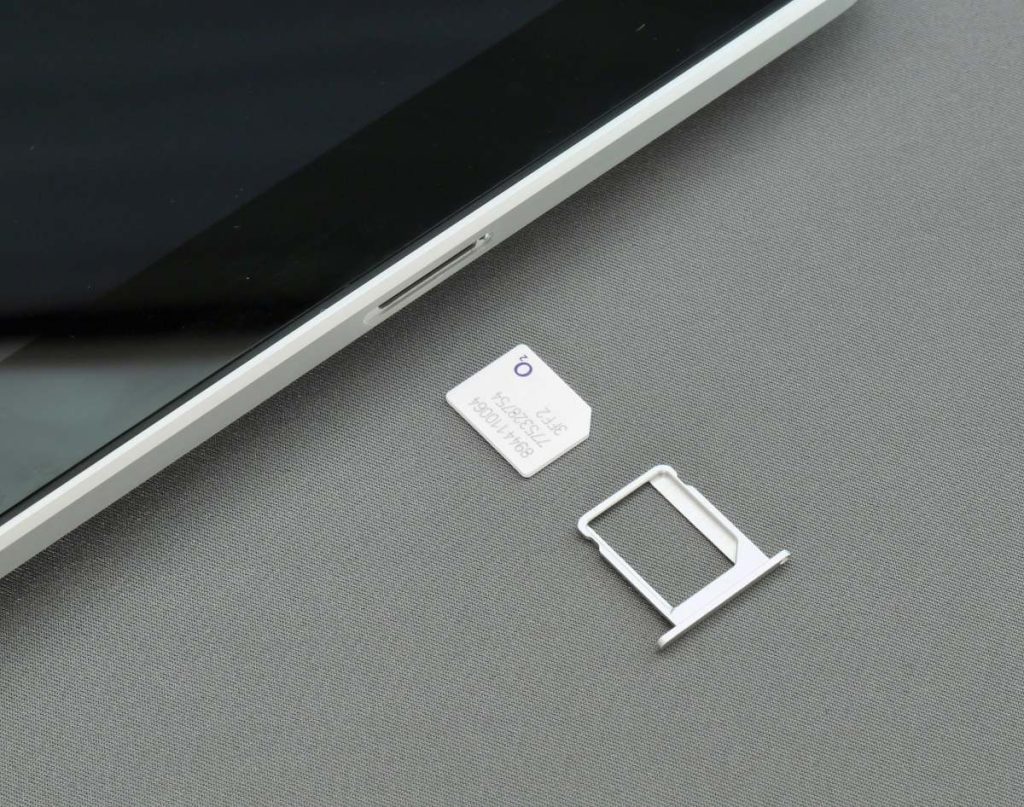
If you’ve been paying for phone service you can barely afford, you may not know that free iPhone SIM card with free service programs exist. And millions of Americans qualify right now.
Through federally funded initiatives like Lifeline and the Affordable Connectivity Program, eligible households can get a working SIM card, monthly data, talk, and text at absolutely no cost.
This guide breaks down exactly which programs are available in 2026, who qualifies, and how to get started today.
1. What Is a Free iPhone SIM Card with Free Service?
A free iPhone SIM card with free service is a government-subsidized benefit that gives eligible Americans a working SIM card and a monthly phone plan at no cost.
These programs are funded at the federal level and delivered through approved wireless carriers like AirTalk Wireless.
How These Programs Work
The primary program behind these benefits is the Lifeline Program, overseen by the Federal Communications Commission (FCC) and designed to make phone and internet service accessible to low-income households.
While the Affordable Connectivity Program (ACP) previously offered additional support, it officially ended in 2024, making Lifeline the strongest and most reliable option available in 2026.
Once approved, you receive a SIM card that activates service on your existing iPhone with no need to switch devices or sign a contract.
What Benefits Are Included
Depending on your state and carrier, your free monthly Lifeline plan typically includes:
- Unlimited talk and text
- A monthly data allowance (varies by provider)
- Free SIM card with no activation fee
- No credit check or long-term commitment


2. Who Qualifies for a Free iPhone SIM Card with Free Service?
To receive a free iPhone SIM card and free service through Lifeline, you must meet at least one of the following eligibility requirements:
Eligibity Requirements
- Income-Based Eligibility
Your household income is at or below 135% of the Federal Poverty Guidelines.
- Program-Based Eligibility
You currently participate in one of these government assistance programs:
- Medicaid
- SNAP (Food Stamps)
- Supplemental Security Income (SSI)
- Federal Public Housing Assistance (FPHA)
- Veterans Pension or Survivors Benefit
- Tribal assistance programs (for those living on qualifying Tribal lands)
Additionally, only one Lifeline benefit is allowed per household, and you must be a U.S. citizen or qualified non-citizen residing in the state where you apply.
Required documents
To apply for a free iPhone SIM card with free service, you must submit documentation to verify your eligibility. Required documents may include:
Proof of income (if applying through income-based)
- Previous year’s tax return
- Pay stubs from the past 3 months
- Social Security benefits statement
Proof of program participation (if applying through program-based)
- Letter or benefit statement from a qualifying program
- Card or official document showing your enrollment
Proof of identity and address
- Government-issued ID (e.g., driver’s license, passport)
- Utility bill or lease agreement (to confirm current address)
For those using or planning to use an iPhone, make sure your device is:
- Unlocked (not tied to a previous carrier)
- eSIM compatible (recommended for faster activation)
- In good working condition if you plan to bring your own device
3. How to Choose the Best Free iPhone SIM Card & Service
Not all Lifeline providers are created equal. When choosing a carrier for your free iPhone SIM card with free service, here is what to look for:
What to Look For
- Network coverage: Make sure the carrier operates on a reliable nationwide network that covers your area.
- Data allowance: Compare monthly data limits across providers, as these can vary significantly.
- iPhone compatibility: Confirm the carrier supports your specific iPhone model before applying.
- Activation process: Look for a simple, straightforward sign-up process with no hidden steps or fees.
- Customer support: Reliable support matters, especially when setting up a new SIM or troubleshooting issues.
Why You Should Choose AirTalk Wireless
AirTalk Wireless checks every box above and is one of the most trusted Lifeline providers in the country. Here is why thousands of eligible Americans choose AirTalk:
- Runs on a major nationwide network with strong coverage across most U.S. states
- Offers a generous monthly data plan at no cost to qualified users
- Fully compatible with a wide range of iPhone models
- Simple online application that takes just minutes to complete
- Dedicated customer support to help you every step of the way
If you qualify for Lifeline, AirTalk Wireless is a straightforward, reliable choice to get your free iPhone SIM card and service activated quickly.


IMPORTANT: The government does not subsidize devices. Lifeline programs cover basic service costs only. Free or discounted devices, upgrade plans, or top-ups are exclusive benefits provided by AirTalk Wireless as part of our promotional offers. Terms and conditions apply. Limited-time promotion—offers vary by state, stock availability, and eligibility.
4. How to Get a Free SIM Card with Free Service for iPhone?
Once you have chosen AirTalk Wireless as your provider, getting started is simpler than you might think. Here is a step-by-step look at how to get your free SIM card with free service for iPhone.
Step-by-step guide to apply online
Getting a free sim card with free service government iPhone is simple and can be done entirely online. Here’s how you can apply step-by-step through AirTalk Wireless, one of the leading Lifeline providers in the U.S.:
Step 1: Check eligibility
Visit the official AirTalk Wireless website:
- Enter your ZIP code to confirm service availability in your area.
- Review whether you qualify through income-based or program-based eligibility (e.g., Medicaid, SNAP, SSI).
Step 2: Choose your plan
Browse the available free SIM card plans and compatible smartphones. AirTalk Wireless offers you two great options:

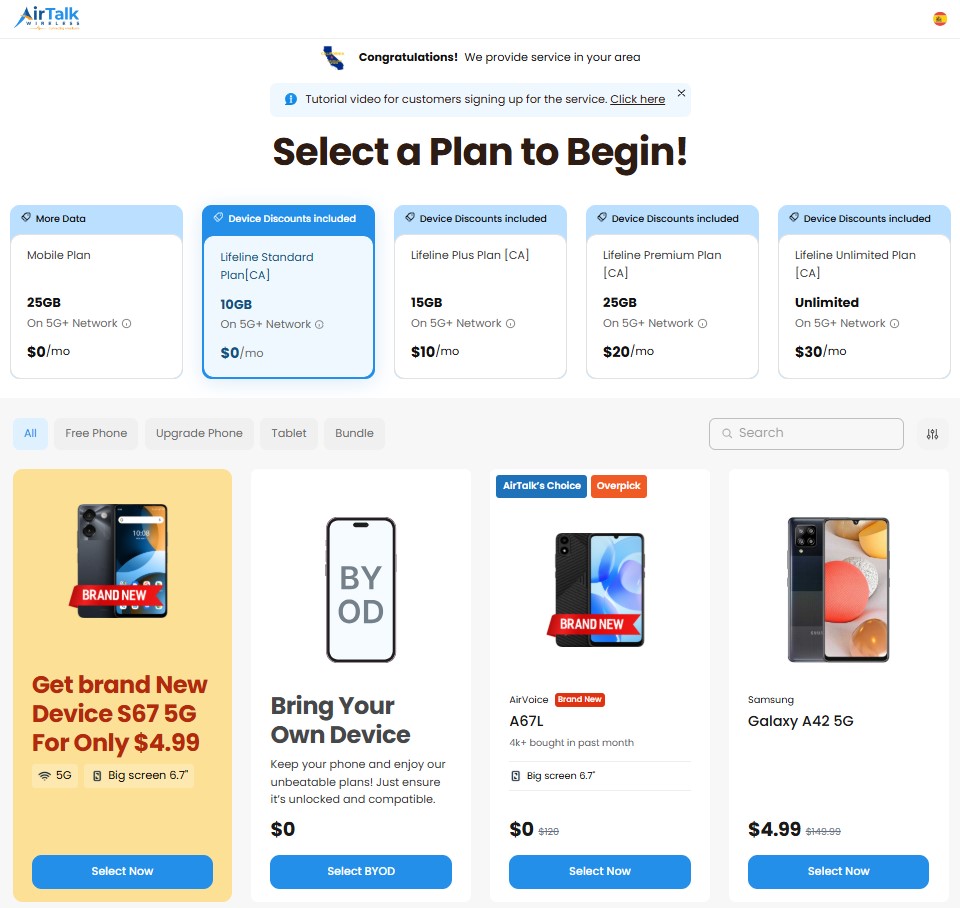
Option 1: Bring Your Own iPhone (BYOD)
- Perfect if you already own an iPhone that is unlocked and in good working condition.
- You’ll receive a free SIM card + free monthly service, including talk, text, and high-speed data.
- With AirTalk Wireless plan-only options, you may receive up to 30GB data/month.
Option 2: Get a free or discounted phone
- Depending on your provider and location, certain device options may be available at low or no cost when you enroll through Lifeline.
- This option also includes the same free monthly service and free SIM card.
Click your preferred option and continue.
Step 3: Select your device option
Now you can choose your device from a list of available free phones. Select the “Free Phone” category, then use the Brand filter to choose Apple to quickly find the most suitable free iPhone that matches your needs and preferences.
Step 4: Complete the application
- Fill out the application form with your personal information (name, address, date of birth).
- Upload the required documents such as proof of income or proof of participation in a qualifying government assistance program.
Step 5: Submit & wait for approval
Once submitted, your application will be reviewed and typically processed within a few days. After approval, AirTalk Wireless will ship your free SIM card (and phone, if selected) to your registered address.
Activating your iPhone SIM card
After receiving your free iPhone SIM card with free service, follow these steps to activate it on your iPhone:
Step 1: Insert the SIM Card
- For physical SIM: Use a SIM ejector tool or paperclip to open the SIM tray and insert the new SIM.
- For eSIM (if eligible): Follow the eSIM activation instructions included in the AirTalk package or email.
Step 2: Power on your iPhone
- Restart your iPhone after inserting the SIM or activating the eSIM.
- Your iPhone should automatically detect the carrier and configure the network settings.
Step 3: Complete APN setup (If required)
Some iPhone models may require manual APN setup. Go to Settings → Cellular → Cellular Data Network, then enter the APN settings provided by AirTalk.
Step 4: Test your service
- Make a test call or use mobile data to confirm the SIM is active.
- If you chose to keep your existing number, test incoming and outgoing calls to verify a successful number transfer.
5. Compatible iPhones and Device Requirements
Getting free iPhone SIM card with free service approved is only half the equation. Your iPhone also needs to meet a few basic requirements before your free SIM card can be activated. Here is a quick breakdown of what is supported.
List of popular iPhone models
AirTalk Wireless supports a wide range of deeply discounted, even free iPhone models for participants in the Lifeline program. This list includes devices from basic to advanced models, designed to meet the diverse needs of users.
Below is a list of popular iPhone models supported by AirTalk Wireless:
| iPhone Models | Retail Price | AirTalk Wireless Price* |
| Apple iPhone 7 | $80.50 | Free |
| Apple iPhone SE | $80.50 | Free |
| Apple iPhone 6s Plus | $69.00 | Free |
| Apple iPhone 6 Plus | $74.75 | Free |
| Apple iPhone 7 Plus | $86.25 | $4.99 |
| Apple iPhone 8 | $92.00 | $9.99 |
| Apple iPhone 8 Plus | $130.00 | $19.99 |
| Apple iPhone 11 | $228.85 | $128.99 |
| Apple iPhone 12 | $247.25 | $144.99 |
| Apple iPhone 1 | $300 | $239 |
*Prices may vary depending on availability, location, and time of application.
What to do if your iPhone is locked?
If your iPhone is carrier-locked, you won’t be able to use it with the free SIM card provided by AirTalk Wireless until it’s unlocked. Here’s what you should do:
Identify the carrier
- Go to Settings → General → About and look for “Carrier Lock.”
- If it says, “SIM Locked,” make note of the current carrier.
Request an unlock from your carrier
Contact your carrier and request that your device be unlocked. Most carriers allow unlocking if the device is fully paid off and account obligations are met.
Wait for confirmation
Once approved, your carrier will either unlock it remotely or provide instructions for a reset.
Test with another SIM
Insert a non-carrier SIM (like one from AirTalk) to check whether the phone is now unlocked.
If you’re unable to unlock your current iPhone, you may still be eligible to receive a free or discounted unlocked iPhone directly from AirTalk Wireless.
>>> Read more: Free Government eSIM For iPhone – How to Get One
6. Bottom Lines
The Lifeline program exists for one reason: to make sure cost is never a barrier to staying connected. If you qualify, a free iPhone SIM card with free service is well within reach, and AirTalk Wireless is one of the easiest and most reliable ways to claim it.
With strong nationwide coverage, iPhone compatibility, and a straightforward application process, getting started takes just a few minutes.
Take the time to check your eligibility, complete your application, and get connected at absolutely no cost. The benefit is there, and you deserve to use it.
7. FAQs
How to get a free government eSIM?
Qualify for Lifeline through income or program-based eligibility, then apply through an approved carrier like AirTalk Wireless.
If your iPhone model supports eSIM, you may be able to activate service instantly online without waiting for a physical card. Availability varies by provider and state, so confirm during the application process.
Where can I get a free SIM card?
Through an approved Lifeline carrier like AirTalk Wireless. Once your application is approved, a SIM card is mailed to your address at no cost. Some providers also offer eSIM activation depending on your location and iPhone model.
Does SIM free mean you can use any network?
Not exactly. “SIM free” means a device is sold without a SIM card, while “unlocked” means it is not tied to a specific carrier. An unlocked iPhone can work with most Lifeline providers including AirTalk Wireless.
If your iPhone is still locked to a previous carrier, you may need to request an unlock before activating your free service.