


Laptops play a central role in how students study, communicate, and complete coursework. From accessing school portals to joining virtual classes and submitting assignments, students rely on personal devices every day. This reality explains why searches for a free laptop program for students continue to rise.
1. Why Free Laptop Programs for Students Are in High Demand
Demand for a free laptop program for students keeps increasing as more coursework, exams, and communication move online. Many schools now rely on digital platforms for assignments, grading, and class updates, which puts pressure on students who don’t own a personal computer.
At the same time, education-related costs continue to rise. Tuition, housing, textbooks, and transportation often take priority over technology purchases, especially for students from low-income households. As a result, students actively search for a free laptop program for students that can reduce upfront costs and help them stay on track academically.
Another factor driving demand is inconsistency in availability. Free laptop programs often open for a short time, operate on limited funding, or restrict eligibility to certain locations. This uncertainty pushes students to look for verified programs and backup options early.


2. Verified Free Laptop Programs for Students (Nonprofit & School-Based)
While there is no universal free laptop program for students available nationwide, several legitimate sources do exist. These programs typically focus on education access and digital inclusion rather than device giveaways.
School and college technology programs
Many colleges and school districts operate laptop loan or distribution programs for enrolled students. These may include:
- Semester-based laptop loans
- Need-based device support through student services
- Emergency technology assistance for financial hardship
Devices are usually provided for academic use and may need to be returned after graduation or the end of the term.
Nonprofit digital equity programs
Some nonprofit organizations refurbish and distribute laptops to students who meet income or enrollment requirements. These programs often:
- Serve low-income students or households
- Require proof of student status and financial need
- Operate on a first-come, first-served basis
Because funding and inventory are limited, waitlists are common, and availability can vary by region.
These verified programs are legitimate but competitive. That’s why many students also explore government-supported assistance and alternative device options when a free laptop program for students is not immediately available.
3. Can Low-Income Students Get a Laptop Through Government Assistance?
Government assistance programs play an important role in helping low-income students access technology. While there is no permanent federal free laptop program for students, certain programs can reduce the cost of devices and provide monthly connectivity support.
Among these options, Lifeline remains the most consistent and accessible form of government-backed assistance for eligible students.
Lifeline Program Support (Tablet Discount for Students)
The Lifeline program is a federal benefit that helps low-income households afford communication services. For eligible students, Lifeline can also provide access to discounted devices through participating providers.
Through approved providers such as AirTalk Wireless, students may be able to:
- Apply online with fast eligibility checks
- Receive free monthly talk, text, and data with an approved plan
- Access discounted devices when available
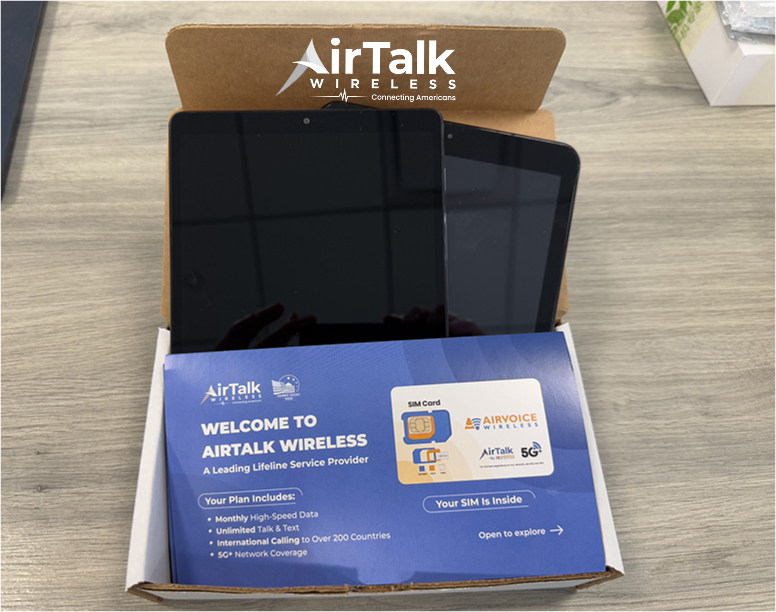
When a Tablet Is a Practical Alternative to a Laptop
When a free laptop program for students is unavailable, tablets can serve as a practical alternative. Many students use tablets to:
- Access learning management systems and school portals
- Join virtual classes and video calls
- Read textbooks, submit assignments, and communicate with instructors
With the addition of a Bluetooth keyboard and mouse, tablets can support most everyday academic tasks. Because tablets are more widely stocked than laptops, they are often the fastest way for low-income students to stay connected.

4. Eligibility Requirements for Student Tech Assistance
Before applying for a free laptop program for students or discounted device support, students must meet specific eligibility requirements. These criteria help ensure assistance goes to those who need it most.
Income-Based Requirements
Income-based eligibility applies to Lifeline and many nonprofit programs. Students may qualify if:
- Household income falls at or below 135% of the Federal Poverty Guidelines
- The student or household participates in qualifying assistance programs such as SNAP, Medicaid, SSI, or Federal Public Housing Assistance
This pathway is often the most reliable option for low-income students seeking device assistance.
Student Enrollment Requirements
Most student-focused programs also require proof of enrollment. Accepted documentation may include:
- A valid student ID
- Enrollment or acceptance letter
- Current class schedule or tuition statement
Some programs require both income verification and enrollment proof, while others may focus on only one criterion, depending on funding rules.
5. How to Apply for a Free Laptop Program for Students (Step-by-Step)
Students looking for a free laptop program for students should follow a clear, structured process to avoid scams and improve approval chances.
Step 1: Check Your Eligibility
Start by confirming whether you qualify based on income level, participation in government assistance programs, or student enrollment status.
Low-income students should prioritize checking Lifeline eligibility first, as this option is active year-round and easier to verify than many school or nonprofit programs.
Step 2: Prepare Required Documents
Having documents ready can speed up the application process. Most programs request:
- A government-issued photo ID
- Proof of income or participation in qualifying assistance programs
- Proof of student enrollment, such as a student ID or enrollment letter
Applications with missing information are more likely to be delayed.
Step 3: Apply Through Official Programs Only
Always apply through verified school websites, nonprofit organizations, or approved Lifeline providers. Avoid third-party links, social media messages, or offers that request fees or sensitive information upfront.
When applying through a Lifeline provider, you must select a service plan as part of the application. Device eligibility (laptops, tablets, or phones) is tied to choosing an active Lifeline service plan.
Step 4: Select Available Devices or Approved Alternatives
If a laptop is available, you may be able to select it during the application. If not, choose an alternative device such as a tablet or smartphone to avoid waiting indefinitely.
Step 5: Submit and Wait for Approval
After submission, approval may be automated or require manual review. Processing time varies by program, and device availability may change during this period.
6. Back-to-School Deals From AirTalk Wireless: Limited Time Only!
AirTalk Wireless is currently running a back-to-school promotion that goes beyond individual devices. For a limited time, qualifying applicants can access package deals that bundle free monthly service with a choice of devices, including phones, tablets, Chromebooks, and hotspots.
Here is what is currently available:
- Free Phone + Up to 12GB: a free smartphone with monthly data, perfect for staying in touch with teachers, school, and family
- Free SIM Card + Up to 300GB per year: more data for homework, educational apps, and online learning
- Chromebook 4 + Hotspot ($79.99 Exclusive Package): ideal for homework, research, online classes, and school projects
- Tablet G17 from $19.99: a capable device with more data for school-year connection (coming soon)
These deals are time-sensitive and subject to eligibility, availability, and location.
Applicants who qualify through SNAP, Medicaid, SSI, or income-based criteria can select the package that best fits their needs during the application process.


7. Alternatives If No Free Laptop Programs Are Available
When a free laptop program for students is unavailable or laptop inventory is temporarily sold out, applying through a Lifeline-supported provider remains one of the most reliable ways for students to access devices and connectivity.
Device Options Available Through AirTalk Wireless
As an approved Lifeline provider, AirTalk Wireless offers multiple device options depending on current promotions and stock availability. While laptops and laptop bundles may be offered during limited-time promotions, inventory can change quickly.
Depending on availability at the time of application, eligible students may find:
- Laptops or laptop bundles (when in stock)
- Free or discounted tablets
- Free smartphones with monthly service
- Smartwatches or device bundles tied to specific plans
Choosing a Practical Device While Monitoring Laptop Availability
When laptops are temporarily unavailable, many students choose tablets or smartphones to avoid delays in accessing online classes and school platforms. Tablets, in particular, can support:
- Virtual learning platforms
- Assignment submissions and research
- Email and school communication
Students can still monitor AirTalk Wireless for future laptop or bundle restocks while staying connected with an available device.
Apply Early and Stay Updated
Because device offers change frequently, students are encouraged to:
- Apply early to secure available device options
- Remain flexible when selecting devices
- Follow AirTalk Wireless for the latest updates on laptop and bundle availability
This approach allows students to maintain access to education tools without waiting indefinitely for free laptop programs to reopen.
IMPORTANT: The government does not subsidize devices. Lifeline programs cover basic service costs only. Free or discounted devices, upgrade plans, or top-ups are exclusive benefits provided by AirTalk Wireless as part of our promotional offers. Terms and conditions apply. Limited-time promotion—offers vary by state, stock availability, and eligibility.
Conclusion
Finding a free laptop program for students can be challenging due to limited funding and availability. While schools and nonprofits do offer legitimate programs, they are often competitive and temporary.
For low-income students, government-supported options like Lifeline remain the most reliable starting point for device assistance and monthly connectivity. When laptops are unavailable, choosing alternatives such as tablets or refurbished devices helps students stay engaged with their education without delays.
Applying early, using official channels, and staying flexible with device options are the best strategies in 2026.
FAQs
Where can I get a free laptop as a student?
Students may receive free laptops through school technology programs, nonprofit digital equity initiatives, or scholarships that include devices. Availability depends on funding, location, and eligibility.
How to claim a free laptop?
Confirm eligibility, gather required documents, and apply through official school programs, nonprofits, or approved government-supported providers. Avoid unofficial links or offers that request payment.
Programs that offer free laptops near me
Local opportunities vary by state and school district. Colleges, community organizations, and nonprofits may distribute laptops periodically. For low-income students, Lifeline-based assistance is often the most consistent option when local programs are unavailable.