


Learning how to call private is essential if you want to protect your phone number, maintain personal privacy, or keep professional and personal calls separate.
This guide explains the most effective methods to make private calls, whether for a single conversation or long-term use, so you can communicate securely without exposing your real number.
1. What is The Benefit Of Making a Private Call?
Understanding how to call someone private allows you to control who can see your phone number, reducing the risk of data exposure and unwanted contact.
Enhanced Personal Privacy and Security
Using a private number masks your real identity, serving as a critical shield against potential threats like identity theft and “SIM swapping,” where scammers attempt to hijack your mobile account.
Prevent your personal information from being sold to third parties or exposed in data breaches.
Professionalism and Credibility
For business owners, a private line creates a more established image by allowing you to use a dedicated business greeting rather than a casual personal one.
It provides a consistent brand identity, as you can select professional area codes or toll-free numbers that signal your commitment to customer service and reliability.
Improved Work-Life Balance
Dedicated private lines allow you to clearly separate professional and personal communications, preventing work-related calls from intruding into your evenings or weekends.
By understanding how to call private, you can control when and how clients or colleagues reach you, using features like “Do Not Disturb” for specific numbers to mentally disconnect from work.
Protection from Unwanted Solicitations
Making private calls or using a secondary number helps minimize distractions by deterring telemarketers and robocallers.
By keeping your main number off public business cards and websites, you can avoid the “floodgates” of unsolicited calls and ensure you only answer critical business or personal inquiries.


2. Method 1: Hide Your Number for a Single Call
This is the most common and versatile method for maintaining privacy on an ad hoc basis, especially if you’re looking to call from a private number without making permanent changes to your phone settings. It’s ideal for one-off calls to strangers or businesses when you want to protect your identity.
This method works at the network level, instructing your carrier to withhold your Caller ID for that specific call.
Using *67 in the US
The vertical service code *67 is the North American standard for blocking Caller ID and is one of the simplest ways to learn how to call private on demand. It works for both landlines and mobile phones across major carriers in the United States and Canada.
How to call from a private number using 67:
- Open the Phone App: Unlock your device and navigate to the phone application. Tap the keypad icon to bring up the dialer interface.
- Input the Code: Before you dial the actual phone number, type *67.
- Enter the Number: Immediately after the code, type the 10-digit phone number (including area code) of the person or business you are trying to reach.
- Initiate the Call: Press the green call button.
The sequence should look like this: *67-555-123-4567.
When the call connects, the receiving phone will suppress your number. It is important to understand what happens on the other end to manage your expectations regarding whether the call will be answered.
What the recipient sees:
- Private: This is the most common display for mobile phones receiving a blocked call.
- Restricted: This often appears on landline Caller ID units or specific carrier networks.
- Unknown: Some networks simply fail to categorize the call and label it as unknown.
- No Caller ID: This is frequently seen on iPhones receiving blocked calls.
It is crucial to note that while this method is highly effective for private calls, it does not work for toll-free numbers (such as 1-800 or 1-888) or emergency services (911).
Alternatives for International Users
While *67 is the standard for the North American Numbering Plan, it will not work if you are traveling abroad or living in a different region.
If you are outside the US, you will need to use the specific code assigned to your country or carrier. The process remains the same: dial the code, followed by the number, and then hit send.
Common International Blocking Codes:
- United Kingdom (141): In the UK and Ireland, the standard prefix is 141. Dial 141 07700 900123 to block your ID.
- Australia (1831): For mobile and landline calls within Australia, dial 1831 before the number. Alternatively, on some mobile networks, #31# is the preferred standard.
- Europe (varies): Many GSM networks in Europe accept #31# as a universal command.
- Japan (184): Dial 184 before the number to withhold your ID.
- New Zealand (0197): The prefix 0197 allows you to hide your number for individual calls.
Because these codes are carrier-dependent, it is always a good practice to test the code first by calling a friend or a secondary phone to confirm that your number is successfully hidden.
>>> Read more: What Phones Are Compatible With AirTalk Wireless?
3. Method 2: Make All Calls Private by Default
If you find yourself constantly dialing *67 before every conversation, it may be more efficient to adjust your phone settings to block your Caller ID permanently. This approach is especially useful if you’re looking for how to make a private call on a regular basis without repeating manual steps each time.
By changing this setting, every outgoing call you make will appear as “Private” or “Unknown.” However, you must be aware of the potential downsides. Many people have “Silence Unknown Callers” features enabled on their smartphones to avoid spam. If you’re researching how to call private, the steps below will help you.
Steps for iPhone Users
Apple has integrated the Caller ID setting directly into the iOS Phone menu. This setting is generally available on all iPhones, though some carriers may hide this menu item, requiring you to contact customer service to enable the feature on your account level.
How to disable Caller ID on iPhone:
- Access Settings: From your home screen, tap the gear icon to open the Settings app.
- Navigate to Phone: Scroll down through the list of apps until you find Phone (represented by the green handset icon) and tap it.
- Find Caller ID: Look for the section labeled “Calls.” Tap on the menu item Show My Caller ID.
- Toggle the Switch: You will see a toggle switch next to “Show My Caller ID.” It will likely be green (on). Tap the switch to turn it off (grey).
Once this switch is toggled off, your number is hidden for all outgoing calls. You do not need to restart your phone for this to take effect.

Steps for Android Users
Android devices have a slightly more fragmented ecosystem, meaning the exact names of menus can vary between Samsung, Google Pixel, Motorola, and other manufacturers. However, the core functionality is usually buried within the “Supplementary Services” or “Operator settings” of the Phone app, rather than the general Android settings menu.
How to disable Caller ID on Android:
- Open the Phone App: Tap the phone icon you use to make calls.
- Access the Menu: Tap the three vertical dots (kebab menu) located in the top-right corner of the search bar.
- Select Settings: From the dropdown menu, tap Settings.
- Locate Calling Accounts: Look for an option labeled Calls, Calling Accounts, or Supplementary Services. On Samsung devices, this is often immediately visible; on Pixel devices, you may need to tap “Calling accounts” and then select your SIM card provider.
- Find Caller ID: Tap on Caller ID or Show my caller ID.
- Change the Setting: A pop-up menu will appear with three options: “Network default,” “Hide number,” and “Show number.” Select Hide number.
Navigational variations for different Android brands:
- Samsung Galaxy: Phone > Three Dots > Settings > Supplementary Services > Show your caller ID > Never.
- LG Phones: Phone > Call Settings > Common > Caller ID > Hide.
- Huawei/Xiaomi: Settings > Wireless & Networks > Call Settings > Additional Settings > Caller ID.
If you select “Hide number” and receive an error message saying “Network or SIM card error,” this confirms that your specific cellular plan does not support user-controlled blocking.
4. Method 3: Use a Second Number for Ultimate Privacy
While hiding your Caller ID is useful, it has a significant functional limitation: it is a one-way street.
If you’re researching how to call private effectively, this approach quickly shows its drawbacks, you can contact others without revealing your real number, but they cannot easily call you back.
Benefits of using a second number
- Two-Way Communication: Allows for callbacks and text messaging, which *67 does not support.
- Professionalism: You can set up a separate voicemail greeting for this number, keeping your business identity separate from your personal life.
- Disposability: If the number starts receiving too much spam or you end a business relationship, you can simply delete or “burn” the number and get a new one
Recommended Apps and Services
There are several reliable options for acquiring a second number, ranging from completely free services to paid subscriptions that offer advanced features like auto-replies and multiple lines.
Google Voice (Best Free Option):
Google Voice is the gold standard for a free secondary number. It links to your Google account and provides a generic US phone number.
- Pros: Completely free for calls to US/Canada; excellent voicemail transcription; integrates with Google contacts.
- Cons: Requires linking an existing US phone number for verification; data mining concerns (since it is a Google product).
Burner (Best for Temporary Use):
The Burner app is designed specifically for short-term use. It allows you to create a number for a specific project (e.g., selling a car) and then delete it instantly.
- Pros: High-quality connections; integrates with apps like Slack and Dropbox; allows you to “burn” the number instantly.
- Cons: Subscription-based (monthly or yearly fees); no free tier for long-term use.
Hushed (Best for International Privacy):
Hushed offers similar features to Burner but with a stronger focus on international numbers and encrypted messaging.
- Pros: Numbers available from over 40 countries; supports private messaging; lifetime plans often available.
- Cons: Call quality can vary depending on data connection; paid service.
How to set up a second number app
- Download the App: Go to the Apple App Store or Google Play Store and download your chosen application.
- Sign Up: Create an account using your email address.
- Choose a Number: You will be prompted to search for a number by area code. Select an area code different from your personal one if you want to mask your general location as well.
- Verify: Most apps require you to verify your identity by sending a code to your real cell phone number. This links the two, allowing the app to forward calls to your device.
- Configure Settings: Set up your notifications and permissions. Ensure the app has permission to use your microphone and send notifications so you don’t miss incoming calls.
>>> Read more: AirTalk Wireless Free Phones iPhone: A Detailed Guide
5. Limitations and What Private Calling Can’t Do
While private calling can hide your number from the recipient’s Caller ID, it comes with several important limitations and does not provide complete anonymity.
Not a Guarantee of Anonymity
While learning how to call private helps you hide your phone number from the recipient’s Caller ID, it does not make you completely anonymous.
Your service provider and the receiving carrier still record the originating number for billing, legal compliance, and network routing purposes, meaning private calling only limits what the call recipient can see, not what the telecom infrastructure can track.
Emergency and Toll-Free Service Exceptions
Private calling features are automatically bypassed when dialing emergency services like 911 or toll-free numbers (such as 800 or 888 prefixes). These systems use Automatic Number Identification (ANI) to ensure dispatchers can locate callers and businesses can identify who is paying for the inbound toll call.
Vulnerability to Unmasking Tools
Technological workarounds and third-party applications, such as TrapCall, allow users to unmask blocked or restricted numbers.
These services utilize back-end routing to identify the source of the call, meaning a “private” status can often be circumvented by a motivated recipient.
Potential for Call Rejection
Many individuals and businesses use “Anonymous Call Rejection” settings on their devices or landlines. If you have private calling enabled, your calls may be automatically disconnected or sent directly to voicemail without the recipient ever being notified that you attempted to reach them.
AirTalk Wireless – Free Phone Program for Low-Income
The federal Lifeline program provides free phone service to low-income individuals and families across the United States.
AirTalk Wireless is one of many providers that participate in this government program, offering eligible people a free smartphone and monthly talk, text, and data at no cost.
Who is Eligible for a Free Phone from AirTalk Wireless?
You may qualify for a free phone and service if you participate in programs such as:
- Medicaid
- SNAP (Food Stamps)
- SSI
- Federal Public Housing Assistance
- Veterans Pension or Survivors Benefit
Or if your household income is at or below 135% Federal Poverty Guidelines.
Step-by-Step Process to Claim a Free Phone and Free Service

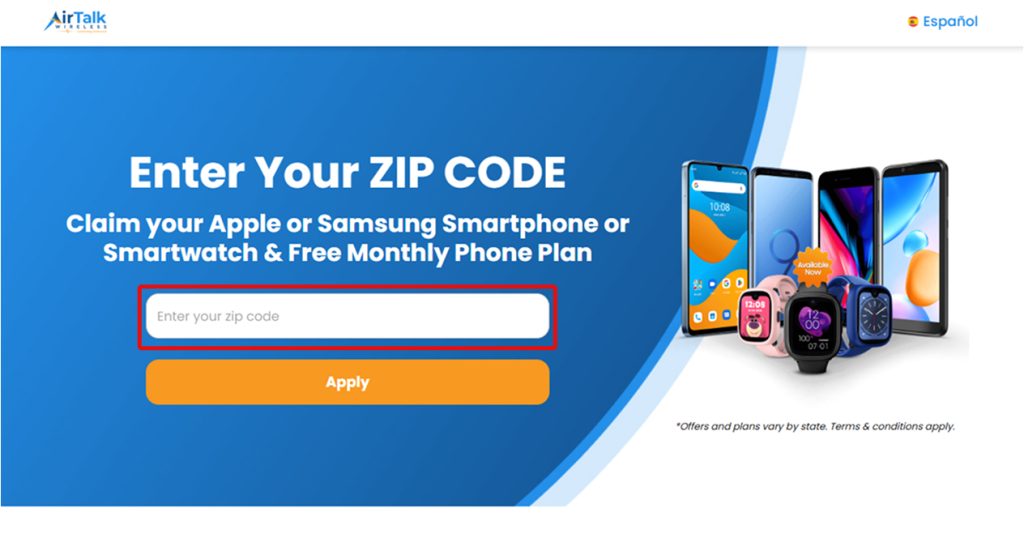
- Check Eligibility: Verify you qualify through income or participation in programs like Medicaid, SNAP, or SSI.
- Enter ZIP Code: Confirm service availability in your location on the AirTalk Wireless website.
- Choose Plan & Device: Select a plan and pick your free phone, tablet, or smartwatch.
- Submit Application: Complete the online form and upload the required proof documents.
- Track Status: Monitor progress and receive updates.
Don’t miss out on free phone service if you qualify. Visit AirTalk Wireless now to check your eligibility and start your application in just a few minutes.
>>> Read more: The Complete Guide to AirTalk Wireless Application Online
6. Frequently Asked Questions (FAQs) About How to Call Private
Does calling with *67 completely hide my identity?
Using *67 hides your phone number from the recipient’s Caller ID, but your carrier and the recipient’s carrier can still see your number for billing, routing, and legal purposes. It provides privacy from the person you are calling, not full anonymity.
Why do some people never answer private or unknown calls?
Many users enable features like Silence Unknown Callers or Anonymous Call Rejection to avoid spam and scam calls. So private calls are often sent directly to voicemail or automatically rejected, especially by businesses and smartphones.
Can I receive a call back if I make a private call?
When you hide your Caller ID using *67 or permanent Caller ID blocking, the recipient cannot see or return your number. If you need two-way communication, using a second phone number app (such as Google Voice or Burner) is a better option.
Does private calling work for emergency or toll-free numbers?
No. Emergency services (911) and toll-free numbers (800, 888, etc.) can always see your number through Automatic Number Identification (ANI). Caller ID blocking is automatically bypassed to ensure safety and proper billing.
Final Words
Understanding how to call private empowers you to protect your personal information, maintain professionalism, and control who has access to your real phone number.
Whether you choose temporary caller ID blocking, permanent privacy settings, or a dedicated second number, each method offers practical advantages depending on your needs.
By applying the right approach, you can communicate confidently while preserving privacy, security, and a healthy work-life balance.